Showing posts with label FM Mode. Show all posts

March 17, 2022

ClearNode Allstar Link and Echolink hotspot node is on the air

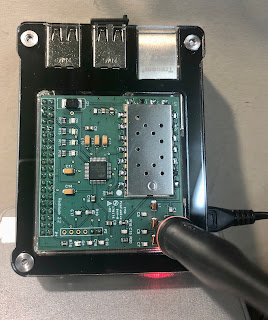
My ClearNode AllStarLink/EchoLink (FM hotspot) simplex node arrived today from Node-Ventures.  Fun!  

For those unfamiliar with AllStarLink, a node is a computer that connects to the AllStarLink network.  A node is often interfaced with an amateur radio and is connected to the internet. Radios can range in size from a repeater to a low power radio integrated into a node (as is the case with the ClearNode).  A node enables the owner to connect to other nodes in the AllStarLink network.

It was super easy to setup and get on the air.  My ClearNode unit came preconfigured so there wasn't much to do other than attach the 440Mhz band antenna and power it up.  I really like the durable case and overall simplicity of the design.


The ClearNode puts out about 500mW and comes with a stubby antenna.  I considered using the stock antenna though I was concerned that it may limit my ability to connect when operating from the backyard with my HT.  I decided to repurpose an unused dual-band rubber duck SMA antenna I had in a drawer to enjoy a bit more gain and extended range.

Testing NJ2X's Clearnode Allstar / Echolink node
 
The ClearNode worked great with both AllStarLink and EchoLink.  I was able to link with repeater nodes all over the world easily using the ClearNode iPhome app.  The software worked flawlessly and offers a ton of configuration options for those that love to experiment.  Node-Ventures have also done an excellent job those who want a simple plug-and-play node.  Kudos!

EchoLink icon

AllStarLink logo
I talked to several hams on various repeaters and then checked-in on the Puget Sound Repeater Group's Nine O’clock Net on WW7PSR in Seattle, Washington.

Coverage around the house was strong with full quieting while using my dual-band HT set to low-power (1W).  This coming weekend I plan to do further testing around the house and outdoor coverage with my HT.

Good DX and 73, NJ2X


April 10, 2021

Amateur Radio Wilderness Protocol

Radio amateurs spending time in the backcountry with their radios are asked to follow The Wilderness Protocol to potentially help someone in an emergency.  Communication capabilities in an emergency situation are extremely important.  Backcountry locations are often without mobile phone service and out of reach of amateur radio repeaters.  

Light-weight low-power amateur radio transceivers (handy-talkies) are easy to carry and provide the possibility of simplex communication in an emergency situation.  However, amateur radio in the backcountry is useful for summoning help only when there is someone listening.  The Wilderness Protocol is described in the ARRL ARES Emergency Resource Manual encourages radio amateurs to listen:
The Wilderness protocol calls for hams in the wilderness to announce their presence on, and to monitor, the national calling frequencies for five minutes beginning at the top of the hour, every three hours from 7 AM to 7 PM while in the back country. A ham in a remote location may be able to relay emergency information through another wilderness ham who has better access to a repeater. National calling frequencies: 52.525, 146.52, 223.50, 446.00, 1294.50 MHz.
The above frequencies are FM simplex calling frequencies in the the US.  It is a good idea to listen on all the prescribed frequencies that your radio is capable of receiving, even if your radio doesn't necessarily transmit on those same frequencies.  You may intercept a call for help and be able to relay it to another station on a frequency your radio does transmit on.

The Wilderness Protocol schedule of listening times are all local times.
  • 7:00 AM to 7:05 AM
  • 10:00 AM to 10:05 AM
  • 1:00 PM to 1:05 PM
  • 4:00 PM to 4:05 PM
  • 7:00 PM to 7:05 PM
California backcountry


It is also a good idea to transmit your call sign once or twice so that others will be alerted to your presence.  Someone experiencing an emergency may hear your transmission and be prompted to respond by asking for your help.
The Wilderness Protocol is simply a recommendation that those outside of repeater range monitor standard simplex channels at specific times in case others have priority or emergency calls. -- FM & Repeaters”, June 1996 QST, p. 85.
As radio amateurs, we can make a difference by using our radios, knowledge, skills, and The Wilderness Protocol.  Now that you know about The Wilderness Protocol, be sure share this information with others including your family, your ham friends, your child's scout troop, your fellow amateur radio club members, and others in your circle.


Good DX and 73, NJ2X


February 7, 2017

Azden AZ-61 6m FM HT - Tip #13 - Specifications

This is an article in a series regarding the vintage Azden AZ-61 6m FM Transceiver.

In its day, the AZ-61 provided a unique product to radio amateurs.  Radio collectors love specifications.

AZ-61 Specifications

  • Reception frequency range: 46.000 - 54.000MHz
  • Transmission frequency range: 50.000 - 53.995MHz
  • Antenna Impedance: 50 Ohms
  • DC Power Input Voltage: +3VDC to +16VDC, negative ground
  • Current consumption (receiving): ~150mA; when squelched: ~48mA; in the Battery Saver mode: ~28mA; in APO mode: ~100uA
  • Current consumption (transmitting): High power: ~1.5A; Low power: ~500mA
  • Dimensions (with BP-11 installed): 65mm x 174mm x 33mm
  • Weight: ~550g (including BP-11, antenna, hand strap, and belt clip)
  • Operating temperature: -20 deg. C to +60 deg. C
  • Transmitting power output: High: 5W; Low: 0.5W
  • Modulation: Variable Reactance Modulation
  • Maximum Frequency Deviation: +/- 5Khz
  • Spurious Output: -60dB or less
  • Built-in Microphone: Electret capacitor type (Impedance: 2k ohms)
  • Receiver method: Double conversion super-heterodyne type
  • RF Sensitivity: FM: Better than 0.16uV for 12dB SINAD
  • First IF Frequency: 16.9MHz
  • Second IF Frequency: 455KHz
  • Squelch sensitivity: 0.1uV or less
  • Selectivity: +/- 6KHz min. (-6dB); +/- 15KHz max (-60dB)
  • Audio Output: 250mW min into 8 ohms with 10% distortion


Photo of the Azden AZ-61 hand held transceiver
Azden AZ-61 HT


Good DX and 73, NJ2X


Other related articles on NJ2X.COM:
Azden AZ-61 6m FM HT - Tip #1 - How to program the radio
Azden AZ-61 6m FM HT - Tip #2 - disabling "the beep"
Azden AZ-61 6m FM HT - Tip #3 - 1993 review article
Azden AZ-61 6m FM HT - Tip #4 - rebuilding the battery pack
Azden AZ-61 6m FM HT - Tip #5 - how to reset the radio
Azden AZ-61 6m FM HT - Tip #6 - Automatic Power-Off
Azden AZ-61 6m FM HT - Tip #7 - VFO Mode
Azden AZ-61 6m FM HT - Tip #8 - Frequency Step
Azden AZ-61 6m FM HT - Tip #9 - Scanning
Azden AZ-61 6m FM HT - Tip #10 - Dual Watch
Azden AZ-61 6m FM HT - Tip #11 - Battery Saver
Azden AZ-61 6m FM HT - Tip #12 - Optional Accessories


© Michael W. Maher and NJ2X.COM, 2017. Unauthorized use and/or duplication of this material without express and written permission from this blog’s author and/or owner is strictly prohibited. Excerpts and links may be used, provided that full and clear credit is given to Michael W. Maher and NJ2X.COM with appropriate and specific direction to the original content.
January 23, 2017

Azden AZ-61 6m FM HT - Tip #12 - Optional Accessories

This is an article in a series regarding the vintage Azden AZ-61 6m FM Transceiver.

Back in the day, optional accessories were available for the Azden AZ-61.  Collectors sometimes like to locate accessories for their original vintage radios.  Here is the list for the AZ-61:

  • BP-11 (12VDC, 600mh) NiCd battery pack
  • LC-16 Soft carrying case
  • SDX-514W Waterproof speaker/microphone
  • AD-16 DC cord
  • ARD-6M Rod antenna for the AZ-61(A)


Photo of the Azden AZ-61 hand held transceiver
Azden AZ-61 HT


Good DX and 73, NJ2X


Other related articles on NJ2X.COM:
Azden AZ-61 6m FM HT - Tip #1 - How to program the radio
Azden AZ-61 6m FM HT - Tip #2 - disabling "the beep"
Azden AZ-61 6m FM HT - Tip #3 - 1993 review article
Azden AZ-61 6m FM HT - Tip #4 - rebuilding the battery pack
Azden AZ-61 6m FM HT - Tip #5 - how to reset the radio
Azden AZ-61 6m FM HT - Tip #6 - Automatic Power-Off
Azden AZ-61 6m FM HT - Tip #7 - VFO Mode
Azden AZ-61 6m FM HT - Tip #8 - Frequency Step
Azden AZ-61 6m FM HT - Tip #9 - Scanning
Azden AZ-61 6m FM HT - Tip #10 - Dual Watch
Azden AZ-61 6m FM HT - Tip #11 - Battery Saver
Azden AZ-61 6m FM HT - Tip #12 - Optional Accessories


© Michael W. Maher and NJ2X.COM, 2017. Unauthorized use and/or duplication of this material without express and written permission from this blog’s author and/or owner is strictly prohibited. Excerpts and links may be used, provided that full and clear credit is given to Michael W. Maher and NJ2X.COM with appropriate and specific direction to the original content.

January 3, 2017

Azden AZ-61 6m FM HT - Tip #11 - Battery Saver

This is an article in a series regarding the vintage Azden AZ-61 6m FM Transceiver.

During normal standby or priority operations the battery saving function can be enabled thereby reducing power consumption.  The battery saving function cannot be enabled during pager, code squelch, or scanning operations.  The initialized value is 500ms.

The battery saver mode reduces receiving current consumption from ~48mA squelched to ~28mA.

The various functions on the vintage AZ-61 are a challenge to operate without instructions.  Hope the information below helps AZ-61 owners master the battery saver on their AZ-61.

Battery Saver

  • To activate the battery saver press the "FUN" + "SAVE" key.

Photo of the Azden AZ-61 hand held transceiver
Azden AZ-61 HT


Good DX and 73, NJ2X


Other related articles on NJ2X.COM:
Azden AZ-61 6m FM HT - Tip #1 - How to program the radio
Azden AZ-61 6m FM HT - Tip #2 - disabling "the beep"
Azden AZ-61 6m FM HT - Tip #3 - 1993 review article
Azden AZ-61 6m FM HT - Tip #4 - rebuilding the battery pack
Azden AZ-61 6m FM HT - Tip #5 - how to reset the radio
Azden AZ-61 6m FM HT - Tip #6 - Automatic Power-Off
Azden AZ-61 6m FM HT - Tip #7 - VFO Mode
Azden AZ-61 6m FM HT - Tip #8 - Frequency Step
Azden AZ-61 6m FM HT - Tip #9 - Scanning
Azden AZ-61 6m FM HT - Tip #10 - Dual Watch
Azden AZ-61 6m FM HT - Tip #11 - Battery Saver
Azden AZ-61 6m FM HT - Tip #12 - Optional Accessories


© Michael W. Maher and NJ2X.COM, 2017. Unauthorized use and/or duplication of this material without express and written permission from this blog’s author and/or owner is strictly prohibited. Excerpts and links may be used, provided that full and clear credit is given to Michael W. Maher and NJ2X.COM with appropriate and specific direction to the original content.

December 27, 2016

Azden AZ-61 6m FM HT - Tip #10 - Dual Watch

This is an article in a series regarding the vintage Azden AZ-61 6m FM Transceiver.

The AZ-61 has dual watch capability which is also called priority operation.  Priority operation can be used with either the VFO model or memory mode.  Dual watch is of the frequency being received and the MA0 channel.  The MA0 channel is scanned approximately every four seconds.  Receiving a signal on the MA0 channel produces a beep sounds and "S" is displayed.

While using the dual watch mode, pressing PTT allows immediate transmission of the channel set in the VFO mode or memory mode.

The various functions on the vintage AZ-61 are a challenge to operate without instructions.  Hope the information below helps AZ-61 owners master priority operation (dual watch) on their AZ-61.

Priority Operation (Dual Watch)

  • To enable or disable priority operation press the "PRI" key.
  • Note: "PRI" lights up on the display when the priority operation is enabled.

Photo of the Azden AZ-61 hand held transceiver
Azden AZ-61 HT


Good DX and 73, NJ2X


Other related articles on NJ2X.COM:
Azden AZ-61 6m FM HT - Tip #1 - How to program the radio
Azden AZ-61 6m FM HT - Tip #2 - disabling "the beep"
Azden AZ-61 6m FM HT - Tip #3 - 1993 review article
Azden AZ-61 6m FM HT - Tip #4 - rebuilding the battery pack
Azden AZ-61 6m FM HT - Tip #5 - how to reset the radio
Azden AZ-61 6m FM HT - Tip #6 - Automatic Power-Off
Azden AZ-61 6m FM HT - Tip #7 - VFO Mode
Azden AZ-61 6m FM HT - Tip #8 - Frequency Step
Azden AZ-61 6m FM HT - Tip #9 - Scanning
Azden AZ-61 6m FM HT - Tip #10 - Dual Watch
Azden AZ-61 6m FM HT - Tip #11 - Battery Saver Azden AZ-61 6m FM HT - Tip #12 - Optional Accessories


© Michael W. Maher and NJ2X.COM, 2016. Unauthorized use and/or duplication of this material without express and written permission from this blog’s author and/or owner is strictly prohibited. Excerpts and links may be used, provided that full and clear credit is given to Michael W. Maher and NJ2X.COM with appropriate and specific direction to the original content.

December 13, 2016

Azden AZ-61 6m FM HT - Tip #9 - Scanning

This is an article in a series regarding the vintage Azden AZ-61 6m FM Transceiver.

The AZ-61 has two scanning modes: VFO mode scanning and memory mode scanning.  The various functions on the vintage AZ-61 are a challenge to operate without instructions.  Hope the information below helps AZ-61 owners master scanning on their AZ-61.

Scanning Overview

  • VFO mode scanning is between two frequencies and is programmable
    • A-bank scanning - scanning is conducted between the receiving frequencies stored in memory channels A19 and A20 using the configured frequency step.
    • B-bank scanning - scanning is conducted between the receiving frequencies stored in memory channels B19 and B20 using the configured frequency step.
  • Note: VFO mode scanning is from low frequency to high frequency.  Be sure to program the lower frequency in A19 when setting up A-bank scanning.  Be sure to program the lower frequency in B19 when setting up B-bank scanning.
  • Memory mode scanning allows scanning of memory channels and is programmable
    • A-bank scanning - scans the memory channels A01 to A20.
    • B-bank scanning - scans the memory channels B01 to B20.
    • A-B bank scanning - alternates scanning of the memory channels, A01 - A20 and B01 - B20.
    • Memory channel skill (lock-out) is possible on all memory channels.

VFO Mode Scanning

  • Make sure the radio is in VFO mode.  If the radio is not in memory mode, press the VFO key.
  • To start scanning, press the SCAN key.
  • When a signal is received, scanning stops.

Memory Mode Scanning

  • Make sure the radio is in memory mode.  M.MODE will blink on the display when in memory mode.  If the radio is not in memory mode, press the MEM key.
  • To start scanning, press the SCAN key.
  • When a signal is received, scanning stops.
Photo of the Azden AZ-61 hand held transceiver
Azden AZ-61 HT


Good DX and 73, NJ2X


Other related articles on NJ2X.COM:
Azden AZ-61 6m FM HT - Tip #1 - How to program the radio
Azden AZ-61 6m FM HT - Tip #2 - disabling "the beep"
Azden AZ-61 6m FM HT - Tip #3 - 1993 review article
Azden AZ-61 6m FM HT - Tip #4 - rebuilding the battery pack
Azden AZ-61 6m FM HT - Tip #5 - how to reset the radio
Azden AZ-61 6m FM HT - Tip #6 - Automatic Power-Off
Azden AZ-61 6m FM HT - Tip #7 - VFO Mode
Azden AZ-61 6m FM HT - Tip #8 - Frequency Step
Azden AZ-61 6m FM HT - Tip #9 - Scanning
Azden AZ-61 6m FM HT - Tip #10 - Dual Watch
Azden AZ-61 6m FM HT - Tip #11 - Battery Saver
Azden AZ-61 6m FM HT - Tip #12 - Optional Accessories

© Michael W. Maher and NJ2X.COM, 2016. Unauthorized use and/or duplication of this material without express and written permission from this blog’s author and/or owner is strictly prohibited. Excerpts and links may be used, provided that full and clear credit is given to Michael W. Maher and NJ2X.COM with appropriate and specific direction to the original content.

November 29, 2016

Azden AZ-61 6m FM HT - Tip #8 - Frequency Step

This is an article in a series regarding the vintage Azden AZ-61 6m FM Transceiver.

The AZ-61's initialized frequency step is 5kHz.  The frequency step can be set to either 5kHZ, 10kHz, or 12.5kHZ.  The various functions on the vintage AZ-61 are a challenge to operate without instructions.  Hope the information below helps AZ-61 owners get the most from their their AZ-61.

Frequency Step

  • To change the frequency step value press: FUN + STEP
  • Note: A double beep will be heard.  The display will not change.
  • Use the UP or DOWN keys to confirm that the frequency step has changed.
Photo of the Azden AZ-61 hand held transceiver
Azden AZ-61 HT


Good DX and 73, NJ2X


Other related articles on NJ2X.COM:
Azden AZ-61 6m FM HT - Tip #1 - How to program the radio
Azden AZ-61 6m FM HT - Tip #2 - disabling "the beep"
Azden AZ-61 6m FM HT - Tip #3 - 1993 review article
Azden AZ-61 6m FM HT - Tip #4 - rebuilding the battery pack
Azden AZ-61 6m FM HT - Tip #5 - how to reset the radio
Azden AZ-61 6m FM HT - Tip #6 - Automatic Power-Off
Azden AZ-61 6m FM HT - Tip #7 - VFO Mode
Azden AZ-61 6m FM HT - Tip #8 - Frequency Step
Azden AZ-61 6m FM HT - Tip #9 - Scanning
Azden AZ-61 6m FM HT - Tip #10 - Dual Watch


© Michael W. Maher and NJ2X.COM, 2016. Unauthorized use and/or duplication of this material without express and written permission from this blog’s author and/or owner is strictly prohibited. Excerpts and links may be used, provided that full and clear credit is given to Michael W. Maher and NJ2X.COM with appropriate and specific direction to the original content.

October 4, 2016

Azden AZ-61 6m FM HT - Tip #7 - VFO Mode

This is an article in a series regarding the Azden AZ-61 6m FM Transceiver.

Scott, K6PYP, sent me an email asking for help with VFO on his AZ-61.  The AZ-61 has two receiving modes: VFO and memory.  The various functions on the vintage AZ-61 are a challenge to operate without instructions.  Thank you Scott for your question.  Hope the information below helps AZ-61 owners master the VFO mode on their AZ-61.

VFO Mode

  • To change from memory mode to VFO mode simply present the VFO key.
  • To change the frequency to 52.520 MHz press the follow sequence of keys:
    • 52*52
  • NOTE: If you don't press the next key within 1.5 seconds after pressing the * key the displayed figure becomes 52.000

UP key and DOWN key

  • You can use the UP key and DOWN key to change frequency.  The frequency will increase or decrease each time you press the UP key or DOWN key.
  • If the frequency difference is large present the FUN + UP or DOWN to change the frequency by 1 Mhz.
  • High speed frequency changes can be made by pressing and holding the UP key or DOWN key.  When the frequency nears the desired value, release the key.  The feature is called TRIUP and TRIDOWN.

Photo of the Azden AZ-61 hand held transceiver
Azden AZ-61 HT


Good DX and 73, NJ2X


Other related articles on NJ2X.COM:
Azden AZ-61 6m FM HT - Tip #1 - How to program the radio
Azden AZ-61 6m FM HT - Tip #2 - disabling "the beep"
Azden AZ-61 6m FM HT - Tip #3 - 1993 review article
Azden AZ-61 6m FM HT - Tip #4 - rebuilding the battery pack
Azden AZ-61 6m FM HT - Tip #5 - how to reset the radio
Azden AZ-61 6m FM HT - Tip #6 - Automatic Power-Off
Azden AZ-61 6m FM HT - Tip #7 - VFO Mode
Azden AZ-61 6m FM HT - Tip #8 - Frequency Step
Azden AZ-61 6m FM HT - Tip #9 - Scanning
Azden AZ-61 6m FM HT - Tip #10 - Dual Watch
Azden AZ-61 6m FM HT - Tip #11 - Battery Saver
Azden AZ-61 6m FM HT - Tip #12 - Optional Accessories Azden AZ-61 6m FM HT - Tip #12 - Optional Accessories


© Michael W. Maher and NJ2X.COM, 2016. Unauthorized use and/or duplication of this material without express and written permission from this blog’s author and/or owner is strictly prohibited. Excerpts and links may be used, provided that full and clear credit is given to Michael W. Maher and NJ2X.COM with appropriate and specific direction to the original content.

February 6, 2016

Azden AZ-61 6m FM HT - Tip #6 - Automatic Power-Off

This is an article in a series regarding the Azden AZ-61 6m FM Transceiver.

Joey, W5TFW, sent me an email asking is there is a timer on the AZ-61 and how to disable it.  The functions on the AZ-61 are a challenge to operate without instructions.  Thank you Joey for your questions.  Hope the information below helps you master the automatic power-off function on your AZ-61.

Automatic Power-Off Overview

  • The automatic power-off function, when enabled, will automatically switch off a preset amount of time after the last transmission.
  • One minute before the switch-off, an alarm is given.
  • The automatic power-off delay is adjustable: 10 minutes, 30 minutes, 50 minutes, 60 minutes, or 120 minutes.
  • The initialized power-off delay is set to 60 minutes.
  • After the automatic power-off function has switched off the radio, the radio can be turned back on by turning the power off, waiting 5 seconds, and then turning the radio back on.
Activate Automatic Power-Off Function

  • Press FUN + APOF to activate the automatic power-off function.
  • APO will be displayed if automatic power-off is activated.

Disabling Automatic Power-Off Function

  • Press FUN + APOF to disable the automatic power-off function.
  • APO will not be displayed if automatic power-off is disabled.

Azden AZ-61 hand held transceiver
Azden AZ-61 HT


Good DX and 73, NJ2X


Other related articles on NJ2X.COM:
Azden AZ-61 6m FM HT - Tip #1 - How to program the radio
Azden AZ-61 6m FM HT - Tip #2 - disabling "the beep"
Azden AZ-61 6m FM HT - Tip #3 - 1993 review article
Azden AZ-61 6m FM HT - Tip #4 - rebuilding the battery pack
Azden AZ-61 6m FM HT - Tip #5 - how to reset the radio
Azden AZ-61 6m FM HT - Tip #6 - Automatic Power-Off
Azden AZ-61 6m FM HT - Tip #7 - VFO Mode
Azden AZ-61 6m FM HT - Tip #8 - Frequency Step
Azden AZ-61 6m FM HT - Tip #9 - Scanning
Azden AZ-61 6m FM HT - Tip #10 - Dual Watch
Azden AZ-61 6m FM HT - Tip #11 - Battery Saver
Azden AZ-61 6m FM HT - Tip #12 - Optional Accessories


© Michael W. Maher and NJ2X.COM, 2016. Unauthorized use and/or duplication of this material without express and written permission from this blog’s author and/or owner is strictly prohibited. Excerpts and links may be used, provided that full and clear credit is given to Michael W. Maher and NJ2X.COM with appropriate and specific direction to the original content.

February 4, 2016

Azden AZ-61 6m FM HT - Tip #5 - how to reset the radio

This is an article in a series regarding the Azden AZ-61 6m FM Transceiver.  John VK2XGJ, recently sent me an email asking how to reset the AZ-61.  Like many of the functions on the AZ-61 resetting the radio is easy to do but near impossible without instructions.  Thank you John for your question.  We hope this information helps you get your AZ-61 back on the air soon.

To reset the AZ-61, turn on the power source while pressing the CLR key.  This  erases all the stored information and returns the radio to the initialized state.


Azden AZ-61 HT


Good DX and 73, NJ2X


Other related articles on NJ2X.COM:
Azden AZ-61 6m FM HT - Tip #1 - How to program the radio
Azden AZ-61 6m FM HT - Tip #2 - disabling "the beep"
Azden AZ-61 6m FM HT - Tip #3 - 1993 review article
Azden AZ-61 6m FM HT - Tip #4 - rebuilding the battery pack
Azden AZ-61 6m FM HT - Tip #5 - how to reset the radio
Azden AZ-61 6m FM HT - Tip #6 - Automatic Power-Off
Azden AZ-61 6m FM HT - Tip #7 - VFO Mode
Azden AZ-61 6m FM HT - Tip #8 - Frequency Step
Azden AZ-61 6m FM HT - Tip #9 - Scanning
Azden AZ-61 6m FM HT - Tip #10 - Dual Watch


© Michael W. Maher and NJ2X.COM, 2016. Unauthorized use and/or duplication of this material without express and written permission from this blog’s author and/or owner is strictly prohibited. Excerpts and links may be used, provided that full and clear credit is given to Michael W. Maher and NJ2X.COM with appropriate and specific direction to the original content.

June 13, 2014

Azden AZ-61 6m FM HT - Tip #4 - rebuilding the battery pack

This is an article in a series regarding the Azden AZ-61 6m FM Transceiver.  One of the weak points of vintage handy-talkies (HT's) is the battery pack.  It is a fact that Ni-cad batteries (or any rechargeable for that matter) have limited useful life.  It is also a fact that radio manufacturers love to create proprietary battery packs for their radios.  If you buy a vintage HT you will likely end up having to replace or refurbish the battery pack.

Azden AZ-61 6m FM Transceiver

Replacing the battery pack on the AZ-61 with new old stock (NOS) is unlikely.  It is possible to rebuild the battery pack yourself.  The process involves carefully cracking the case (a Dremel can help with this task), replacing the batteries, and then resealing case with tape.

Good DX and 73, NJ2X


Other related articles on NJ2X.COM:
Azden AZ-61 6m FM HT - Tip #1 - How to program the radio
Azden AZ-61 6m FM HT - Tip #2 - disabling "the beep"
Azden AZ-61 6m FM HT - Tip #3 - 1993 review article
Azden AZ-61 6m FM HT - Tip #4 - rebuilding the battery pack
Azden AZ-61 6m FM HT - Tip #5 - how to reset the radio
Azden AZ-61 6m FM HT - Tip #6 - Automatic Power-Off
Azden AZ-61 6m FM HT - Tip #7 - VFO Mode
Azden AZ-61 6m FM HT - Tip #8 - Frequency Step
Azden AZ-61 6m FM HT - Tip #9 - Scanning
Azden AZ-61 6m FM HT - Tip #10 - Dual Watch
Azden AZ-61 6m FM HT - Tip #11 - Battery Saver
Azden AZ-61 6m FM HT - Tip #12 - Optional Accessories
Azden AZ-61 6m FM HT - Tip #13 - Specifications


© Michael W. Maher and NJ2X.COM, 2014. Unauthorized use and/or duplication of this material without express and written permission from this blog’s author and/or owner is strictly prohibited. Excerpts and links may be used, provided that full and clear credit is given to Michael W. Maher and NJ2X.COM with appropriate and specific direction to the original content.

May 24, 2014

Azden AZ-61 6m FM HT - Tip #1 - How to program the radio

The Azden AZ-61 6m handi-talkie (HT) can be found from time-to-time at hamfests for a relatively low price.  Buying one without the manual; however, can be a rather frustrating experience since the radio's design is far from intuitive.  This isn't the kind of radio that you can put in your hand and program without looking at a manual.  Almost anyone who has owned one would agree that it is downright difficult to program the AZ-61 (even with the original manual).

Azden AZ-61 6m FM Transceiver
After searching the Internet, we discovered that there are rather few resources to guide the manual-less Azden AZ-61 owner in programming the radio.  As a consequence, there are probably more than a few fully functional units out there just sitting on a shelf collecting dust for lack of ability to program.  If you are one of those owners, we prepared this short tutorial on programming the Azden AZ-61 for you.  We hope it inspires you to dust-off your Azden AZ-61 (or snap one up at a hamfest), program a repeater or two, and get it back on the air.

How to program a repeater into the Azden AZ-61

In the following step-by-step example, we will program a local 6m repeater located in Ben Lomond, California (WR6AOK, output = 52.800 MHz, offset = -0.500 = 52.500 MHz, PL = 114.8) to the Azden AZ-61's memory address "MA0".

"MA0" is the main memory channel and can be recalled quickly via the dedicated MA0 button on the front left of the radio.  This is a pretty handy feature.

Step 1: Turn on the program mode

  • In order to program the radio you need to first enable the programming mode. 
  • Press "FUN" + "0" (at the same time) and hold for 1 second
  • The LCD display will show a blinking "PR"
  • Note: The programming mode is automatically turned off when the radio is left idle for 10 seconds or more.  This is an irritating "feature" since it forces you to repeatedly re-enable the programming mode (unless you are fast at going through the programming steps).  Be prepared to get a lot of practice on turning on the program mode.

Step 2: Select the memory address to program

  • For our example, we are going to program the memory address "MA0".
  • Using the up or down arrow buttons (located to the right of the LCD), select the memory address, "MA0".
  • "MA0" will appear in the upper left hand corner of the LCD when selected.
  • Press the "#" key

Step 3: Enter the receive frequency

  • For our example, we are going to program a receive frequency of 52.800 MHz.
  • Note: The AZ-61 does not have a decimal key.  Instead, use the "*" to denote the decimal when entering the frequency.  
  • Enter the frequency by pressing the keys, 52*800
  • Press the "#" key

Step 4: Enter a receive CTCSS frequency

  • For our example, we do not want to use a CTCSS frequency (not sure if the repeater transmits the CTCSS) so we are going to program this memory address to disable that feature.
  • Using the up and down arrow buttons (located to the right of the LCD), select "C00:"
  • Press the "#" key

Step 5: Enter transmit frequency

  • For our example, we are going to program a transmit frequency of 52.500 MHz.
  • Note: The AZ-61 does not have a decimal key.  Instead, use the "*" to denote the decimal when entering the frequency.  
  • Enter the frequency by pressing the keys, 52*500
  • Press the "#" key

Step 6: Enter transmit CTCSS frequency

  • For our example, we are going to program a transmit CTCSS frequency of 114.8 Hz.
  • Note: The CTCSS frequencies are stored in the AZ-61 in a table.
  • Using the up and down arrow buttons (located to the right of the LCD), select the "C16: 114.8"
  • Press the "#" key
Voila!  We have programmed a repeater into the Azden AZ-61 in just six easy steps.  Armed with these steps you can repeat the same procedure to program any of the other 40 memory addresses.  Hope this article has inspired you to put  your AZ-61 back on the air.

Considering its age, there are a surprising number of other features that can be programmed into the Azden AZ-61.  Perhaps this is a good example of how more can be less.  In the case of the AZ-61, more features seem to have led to less usability / programmability.  We may cover additional programming topics in a future article if there is interest.  Drop us a line and let us know.


Good DX and 73, NJ2X


Other related articles on NJ2X.COM:
Azden AZ-61 6m FM HT - Tip #1 - How to program the radio
Azden AZ-61 6m FM HT - Tip #2 - disabling "the beep"
Azden AZ-61 6m FM HT - Tip #3 - 1993 review article
Azden AZ-61 6m FM HT - Tip #4 - rebuilding the battery pack
Azden AZ-61 6m FM HT - Tip #5 - how to reset the radio
Azden AZ-61 6m FM HT - Tip #6 - Automatic Power-Off
Azden AZ-61 6m FM HT - Tip #7 - VFO Mode
Azden AZ-61 6m FM HT - Tip #8 - Frequency Step
Azden AZ-61 6m FM HT - Tip #9 - Scanning
Azden AZ-61 6m FM HT - Tip #10 - Dual Watch
Azden AZ-61 6m FM HT - Tip #11 - Battery Saver
Azden AZ-61 6m FM HT - Tip #12 - Optional Accessories


© Michael W. Maher and NJ2X.COM, 2014. Unauthorized use and/or duplication of this material without express and written permission from this blog’s author and/or owner is strictly prohibited. Excerpts and links may be used, provided that full and clear credit is given to Michael W. Maher and NJ2X.COM with appropriate and specific direction to the original content.

November 23, 2011

Chasing 10m FM DX

There are so many interesting modes in which to operate our amateur radios.  Most hams are familiar with the "meat-and-potatoes" modes like, CW, SSB, AM, and RTTY.  Surprisingly, few hams seem to have tried working DX with FM.  The return of sunspots provides ham with an opportunity to jump into FM DX'ing.  You can work 10m FM DX with a modest station - a 100W rig and an 10m antenna will do the job.

You can even work QRP (low power < 5w) FM DX when the 10m band is open.  This is really amazing thing to experience.  Give it a try sometime.  One approach is to start the QSO with higher power and then back the power level down to QRP and see if you can maintain the contact.  How low can you go?  Another approach is to simply work the contact with low power.

Kenwood TS-480SAT HF + 6m Transceiver

Generals, Advanced, and Amateur Extra's have HF FM privileges on the 10m band.  The United States HF band plan allows FM between 29.6Mhz and 29.7Mhz.

5 Tips for 10m FM DX
  1. Keep the QSO short  - 10m FM DX is fast paced since the conditions are typically unstable.  Make the exchange quickly so you can log the contact.
  2. Monitor beacons for 10m openings - When 10m is open, dial up the 10m FM band plan frequencies.
  3. Monitor spots for 10m FM - Monitor 10m spots and look for frequencies that fall within the US FM band plan.  Once you see a spot, move quickly as the station will often disappear quickly.
  4. 29.600Mhz is the FM simplex calling frequency.  This is a good place to start listening.
  5. Dial up-and-down.  FM simplex changes quickly.  Stations will appear and disappear.  Keep moving, listening, and pounce.
On November 20, 2011, we had a great time making 10m FM contacts with Europe including OK2OV (Czech Republic), PB2A (The Netherlands), and GI7AXB (Northern Ireland).  All of these contacts were with full quieting and rich audio.  10m FM DX can sound awesome!

If you have a 10m radio with FM, we encourage you to get onto 10m and try working FM DX.  You will be amazed that this typically local mode works so well over great distances.  You will also enjoy the nice clean sound of FM too.

© Michael W. Maher and NJ2X.COM, 2011.

October 23, 2011

Flying With An HT

In this day and age of increased airport security and frequently changing TSA rules,  many hams are understandably unsure if they are permitted to travel with their amateur radio transceiver / HT when flying.  We have travelled by air with our trusty Kenwood TH-F6A HT domestically and internationally many times without issue.  However, we did so only after researching the topic thoroughly to avoid problems.  The bottom line is: educate yourself, travel smart, and enjoy travelling with your radio.


There are several considerations regarding travelling with an amateur radio or HT. 

Consideration #1) Follow the FCC part 97.11 rules related to stations aboard aircraft.
Part 97 : Sec. 97.11 Stations aboard ships or aircraft. (a) The installation and operation of an amateur station on a ship or aircraft must be approved by the master of the ship or pilot in command of the aircraft.
(b) The station must be separate from and independent of all other radio apparatus installed on the ship or aircraft, except a common antenna may be shared with a voluntary ship radio installation. The station's transmissions must not cause interference to any other apparatus installed on the ship or aircraft.
(c) The station must not constitute a hazard to the safety of life or property. For a station aboard an aircraft, the apparatus shall not be operated while the aircraft is operating under Instrument Flight Rules, as defined by the FAA, unless the station has been found to comply with all applicable FAA Rules.

Consideration #2) Carry on versus checking.
  • Common wisdom is that it is safer for your HT to travel with you in your carry-on bag.
  • Checking your HT brings with it a risk of physical damage from rough handling or possibly theft.
  • Some hams disconnect their HT's antenna as a precaution against breaking off the sometimes-fragile connector.  SMA connectors are notoriously fragile.
  • The TSA's website offers guidance regarding safe travel with devices having batteries.
    • "Keep batteries and equipment with you, or in carry-on baggage - not in your checked baggage! In the cabin, flight crew can better monitor conditions, and have access to the batteries or device if a fire does occur."
Consideration #3) Use of HT while on board the aircraft.
  • Common sense is simple - keep your HT powered off while on board an aircraft.
  • Generally, airlines prohibit turning on radios (i.e. radios are not approved electronic device).
  • Consult with FCC part 97.11 rules.
  • Consult with FAA part 91.21 rules.
Sec. 91.21 Portable electronic devices
(a) Except as provided in paragraph (b) of this section, no person may operate, nor may any operator or pilot in command of an aircraft allow the operation of, any portable electronic device on any of the following U.S.-registered civil aircraft:
(1) Aircraft operated by a holder of an air carrier operating certificate or an operating certificate; or
(2) Any other aircraft while it is operated under IFR.
(b) Paragraph (a) of this section does not apply to--
(1) Portable voice recorders;
(2) Hearing aids;
(3) Heart pacemakers;
(4) Electric shavers; or
(5) Any other portable electronic device that the operator of the aircraft has determined will not cause interference with the navigation or communication system of the aircraft on which it is to be used.
(c) In the case of an aircraft operated by a holder of an air carrier operating certificate or an operating certificate, the determination required by paragraph (b)(5) of this section shall be made by that operator of the aircraft on which the particular device is to be used. In the case of other aircraft, the determination may be made by the pilot in command or other operator of the aircraft.

Consideration #4) Documentation.
  • When travelling domestically, you may not need to carry your FCC license.  However, it certainly wouldn't hurt to bring it with you and it may actually help if you find yourself trying to explain your HT to airline or TSA personnel.
  • When travelling internationally, bringing your FCC license is both prudent and often necessary per the laws of many countries.
  • It is important to consult with the laws of the countries you intend to travel through.
  • In certain parts of the world, it is possible to be challenged when crossing borders regarding your ownership or place of purchase of an expensive piece of equipment (like a radio).  In these circumstances it is valuable to have a copy of your receipt.  This will help you prove you own the item and that you purchased in your home country.
Consideration #5) Is it worth the bother to bring an HT on a trip?
  • In our opinion, travelling with an HT is very enjoyable to travel with and definitely worth bringing.
  • It is fun to work local repeaters and make contacts with an HT.
  • It is fun to listen to local broadcast radio if your HT includes a wide band receiver.
  • It is fun to travel with other hams who also have their HT's and stay in contact while in your destination.
  • It is fun to use APRS to report your position and other information while travelling.
We hope you find this article an informative and helpful guide on how to educate yourself to make your own decision on travelling with an amateur radio transceiver or HT.  As we write this article we are enjoying listening to a lively discussion on a 2m net via our HT while on a trip.  Having travelled extensively with our HT, our motto is, "don't leave home without it".

Happy Trails and 73,

NJ2X


Related articles on NJ2X.com:

Be sure to check out the NJ2X.com Kindle edition. 


© Michael W. Maher and NJ2X.COM, 2011. Unauthorized use and/or duplication of this material without express and written permission from this blog’s author and/or owner is strictly prohibited. Excerpts and links may be used, provided that full and clear credit is given to Michael W. Maher and NJ2X.COM with appropriate and specific direction to the original content.